
Updating the plant settings will only reflect upon the next data refresh, usually the next day.
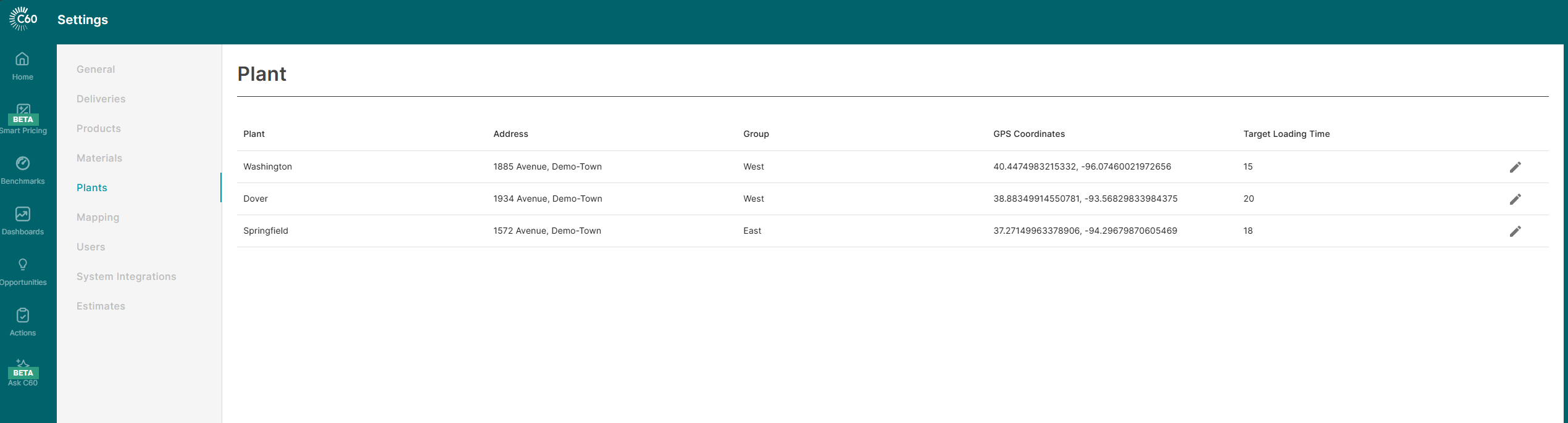
Plant Group
Plant Groups can be used to categorize plants into a group to easily filter and view data pertaining to each group in the dashboards. You can create as many groups that you desire for and select the group in the dropdown to associate a plant to a group

Address
Address of the plant that will be displayed in dashboards
GPS Coordinates
Latitude and longitude of the plant, will be used to place the plant marker on the maps. This data is usually picked from your source systems, and if it doesn't exist in your data, then you can add these co-ordinates in this setting to see the plants populated in the map widgets in the dashboards.
Target Loading Time
Average time in minutes that it takes from start load to leave plant. This is designed to include the "in-yard washdown time".
This value is used when determining the delivery cycle minutes as it relates to customer performance. C60 does not use the actual loading time when comparing the cycles times of customers as the customer has limited impact the loading duration. Therefore, if a customer has a higher cost to service than the average customer, it is purely based on factors that they have the most control over. This includes load size, on-site time, waiting time, pouring time and travel time.
Plant group settings impacts the plant filter options in ALL dashboards.
Target loading time impacts the following dashboards:
- Customer Cost of Service
- Customer Scorecard
- Margin by Customer
- Sales Analyzer