
What is delivery type
Delivery type refers to the method used to deliver the concrete. C60 use two categories for the expected outcome, these include:
- Delivery – concrete was delivered by the concrete producer
- Pickup – concrete was picked up at the plant. Also known as F.O.B
The function of delivery type
C60 uses these two classifications in multiple logistics and margin-based dashboards to either include or exclude data from these two types of deliveries.
Example: In the Customer Cost of Service dashboard, we exclude any deliveries that have been flagged as “pickup”. This allows C60 to disregard the data from pickup deliveries from impacting the cost to service for individual customers or projects. Often with pickup deliveries, producers tend to not receive accurate data that aids in calculating the cost to service for customers. The data that is typically missing are the vital timestamps for the different phases in a delivery cycle. Without these timestamps, we cannot accurately analyse the on-site performance of a customer and therefor will not include these deliveries, and volume, from the Customer Cost of Service dashboard. In addition to the data concerns, when a delivery is truly picked up at the plant, the producer is not incurring any delivery costs and therefor should not be concerned with the duration of the delivery or the load size.
How to flag a delivery as delivered vs picked up
The delivery type is determined based off a data field that is ingested from a producer’s dispatching system. The output of the data field is then mapped in the admin settings in the C60 application to either delivery or pickup. This is customizable in the admin settings to allow producers the flexibility to choose to include or exclude unique situations that relate to their business practices. Such as producers that use hired haulers or contracted trucks to deliver their concrete.
Each RMC dispatch system has a unique process of marking deliveries as picked up or delivered. The process for each dispatch system below.
Sysdyne
C60 uses a field called Delivery Method which is assigned to individual trucks in the setup page. Sysdyne has three options for this field; Company truck, F.O.B truck and Hauler truck. Based off the delivery method designation of the truck and the mapping in the C60 application admin settings, any delivery that is hauled by this truck will be flagged as delivery or pickup.
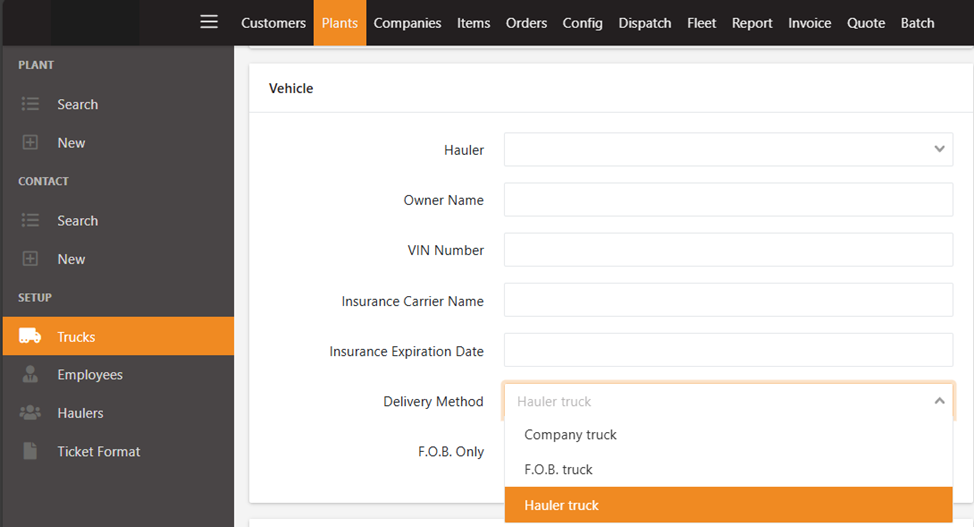
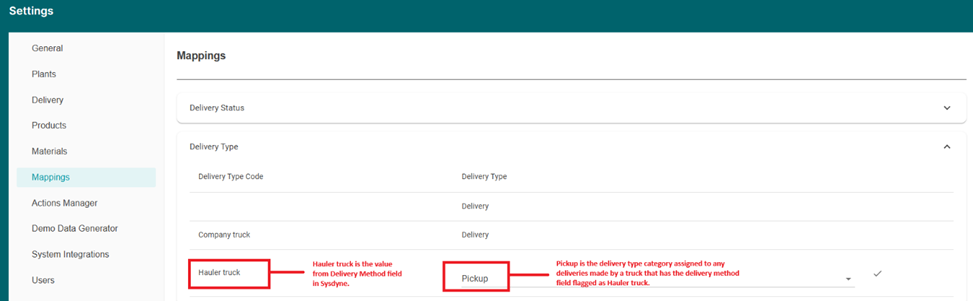
If you do not see all the options from Sysdyne in the admin settings, in this example we do not see the F.O.B truck option. The means that none of the trucks are currently marked as F.O.B truck. As for the “blank” option above Company Truck, this mean that one or more trucks do not have the Delivery Method field populated. You are still able to categorize these trucks as either delivery or pickup in our application.
It is best practice to ensure all trucks have the proper delivery method type populated in your Sysdyne system.
Marcotte
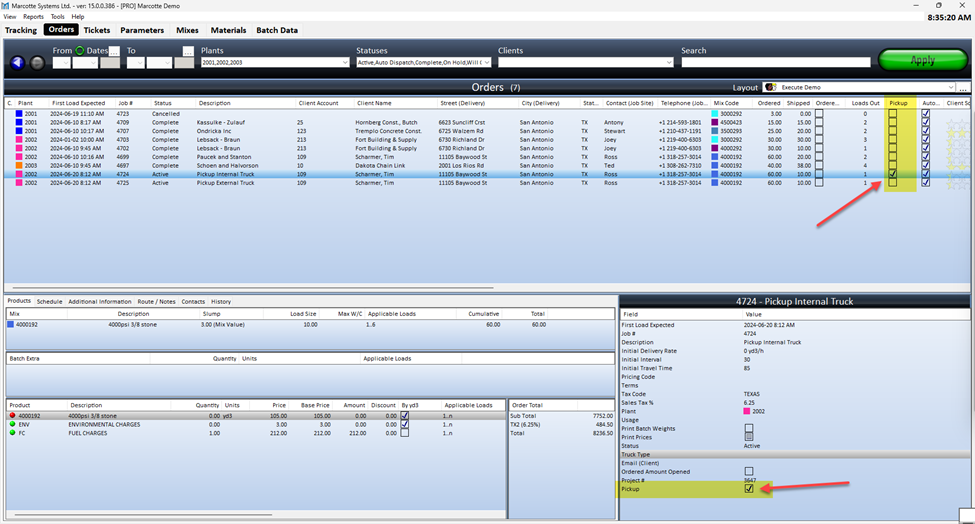
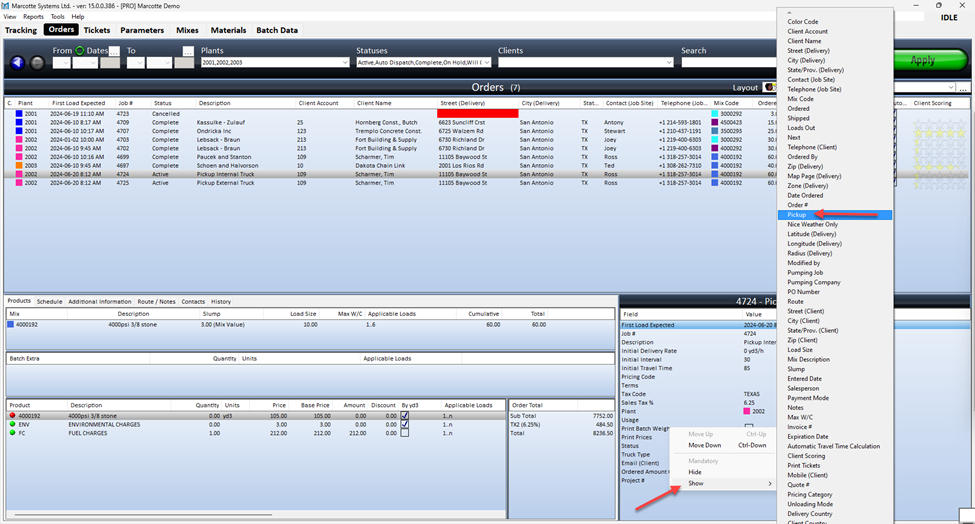
C60 uses a field called Pickup from the order section in Marcotte. This field has two selectable options: YES (checkmark in box) or NO (no checkmark in box).
When this field for a delivery is marked as NO (which is the default option) C60 will categorize this delivery and delivered by the producer.
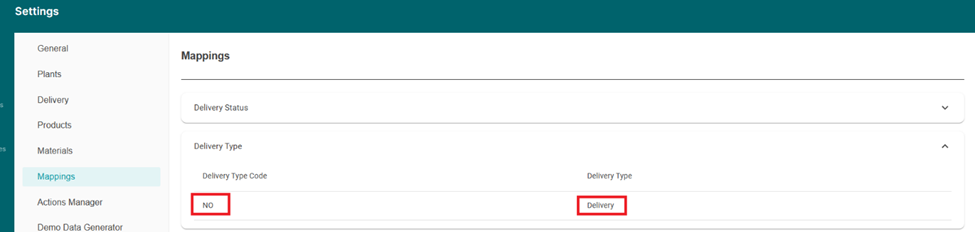
From the C60 admin settings, the delivery type code options (in this case there is only 1 option: NO) refer to the values that come from the Pickup field in Marcotte. The reason we do not see the option YES is because no tickets in Marcotte were marked YES for pickup and therefor not an option in the mapping page. Once a delivery is flagged YES, it will appear in the settings and can be mapped appropriately to pickup.
To display the “Pickup” field on the order details list
- Right click anywhere in the order details list.
- Click “Show”
- Click on “Pickup”
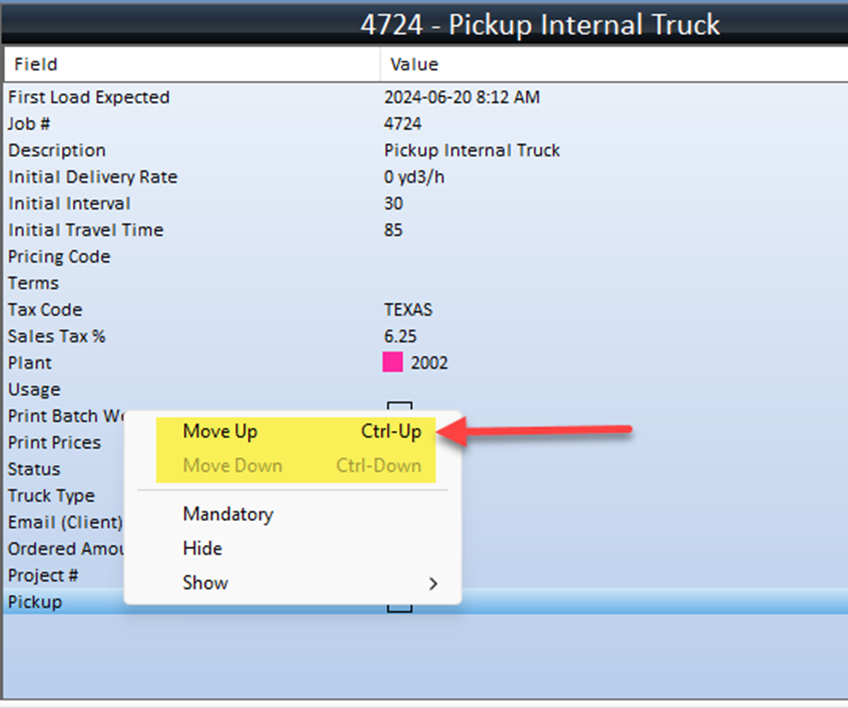
- You can re-order the filed by right clicking on it and select Move Up or Move Down, or use the keyboard key combination: ctrl + up arrow or ctrl + down arrow
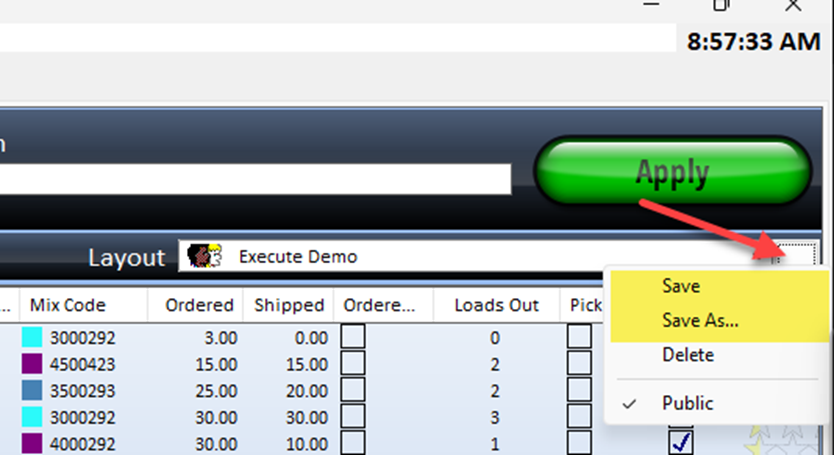
- Make sure to save your layout
To save the layout
- Click on the three dots next to Layout.
- Select Save or Save As
MPAQ
C60 currently flags all deliveries as delivered by the producer as there does not exist, in the current API, a method to differentiate between the two delivery types.