
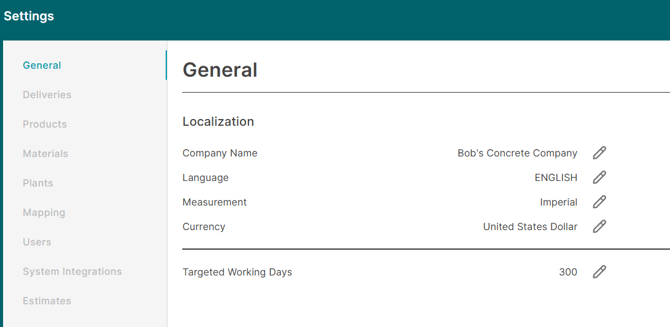
Updating these settings will reflect almost instantly in the dashboards.
Company Name
Name of the company.
Language
Language that will be used across C60. For now, only English is supported.
Measurement
Select between imperial or metric units .
Currency
The currency in which C60 will show the different currency values. Note we do not convert currency values, only update the labels.
Targeted Working Days
Targeted working days is the days per year your business plans to operate. This value will impact the truck usage metrics found in the Truck Activity Comparison and Truck Usage dashboards.
Example:
If you set your targeted working days to 300 which averages to roughly 6 days per week. Your available working days in a standard 30 day month would be (300/365) * 30 = ~25 available days. If a single truck delivers at least 1 load on 20 days. The truck would have a usage score of ~80%.
If you set your targeted working days to 250 which averages to roughly 5 days per week. Your available working days in a standard 30 day month would be (250/365) * 30 = ~21 available days. If a single truck delivers at least 1 load on 20 days. The truck would have a usage score of ~95%.
If you set your targeted working days to 365 which equates to 7 days per week. Your available working days in a standard 30 day month would be (365/365) * 30 = 30 available days. If a single truck delivers at least 1 load on 20 days. The truck would have a usage score of ~67%.
Our recommendation is to select a target working days based on the average number of days your business operates a month and multiple the value by 12. The main goal of our usage metrics is not to score 100% per truck but rather identify the percentage of days each individual truck works relative to the fleet average, which can then be leveraged into strategic fleet sizing & allocation decisions.
Target Working Days impacts the usage metrics within the Truck Activity Comparison and Truck Usage dashboards.