
Changes to this setting may take a few minutes to appear in the dashboards unless specified
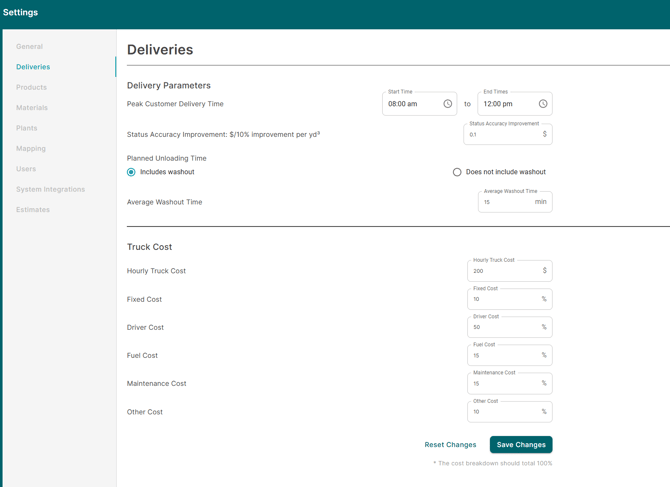
Peak Customer Delivery Time
The hours you consider as your peak time of your operations.
This setting is only used in the Customer Cost of Service dashboard to determine the percent of deliveries in peak time. Any delivery where the truck has left the plant during the peak time window will count towards a delivery in peak time.
Currently you may only have 1 peak time window.
Status Accuracy Improvement ($/10% improvement per volume)
Each time there is a 10% Status Accuracy Improvement, how much is that worth to your business per cube of concrete.
❌This setting is no longer required.❌
Planned Unloading Time
This settings is designed to allow producers the flexibility to increase the amount of planned on-site time for dispatching systems that do not have the ability to estimate a post pour washout time during the scheduling phase. C60 uses this field in conjunction of planned on-site times to verify the accuracy of telematics data.
Select between two options: 1. includes washout or 2. does not include washout.
If "Includes washout" is selected. C60 will use the planned onsite time that comes directly from your dispatching system.
If "Does not include washout" is selected. C60 will add additional minutes to the planned onsite time based on the value of average washout time.
Planned Unload time will only be reflected on the next data refresh, usually happens by the next day.
Average Washout Time
If the Planned Unloading Time doesn't account for washout time , then what is the washout time on an average.
Average Washout Time will only be reflected on the next data refresh, usually happens by the next day.
Truck Cost
Hourly Tuck Cost represents the average cost to operate and maintain a RMC truck. This field is utilized in all sales and delivery related dashboards.
The sub-categories that include fixed, driver, fuel, maintenance and other costs are designed to allow producers to allocate a percent of total hourly cost to the respective cost category. Dashboards like Truck Usage and Truck Activity Comparison use a portion of the hourly trucking cost to estimate the opportunity values. For example, Truck Usage dashboard estimates the opportunity based on fixed cost portion of the hourly trucking cost as the dashboards aims to highlight the cost savings of disposing of an asset.
Currently, the hourly trucking cost is applied universally and cannot be configured on a plant by plant basis.
F.A.Q
1. How do I calculate my hourly trucking cost?
There are many approaches a producer can take to estimate their hourly trucking cost. In the end, there are no right or wrong answers as the main goal of our dashboards is to highlight which customers or assets are underperforming compared to one another. Adjusting the hourly trucking cost simply adjusts the value of the opportunities in the dashboards.
Method 1: All in delivery cost method
This method involves a producer reviewing their P&L statement for the last 12 months to identify their all in delivery cost per cubic yard/meter. Once this value is known, a producer can then use the Customer Cost of Service dashboard to adjust the hourly trucking cost until the average cost per cubic yard/meter aligns with the value from the P&L statement.
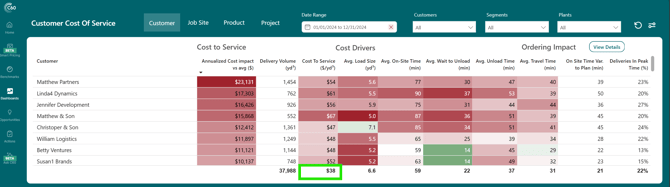
Example: If my P&L statement has a 12 month average delivery cost of $38/y³.
As a C60 user, I will adjust the hourly trucking cost until the all customer average cost to service matches.
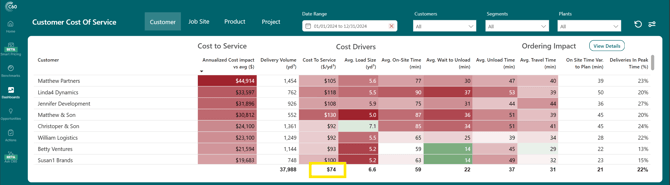
The all customer average cost to service when the hourly trucking cost is at $200/hour equals $74/y³.
When I adjust the hourly trucking cost using the settings in the top right to read $103/hour, the all customer average cost to service aligns with my value from the P&L.
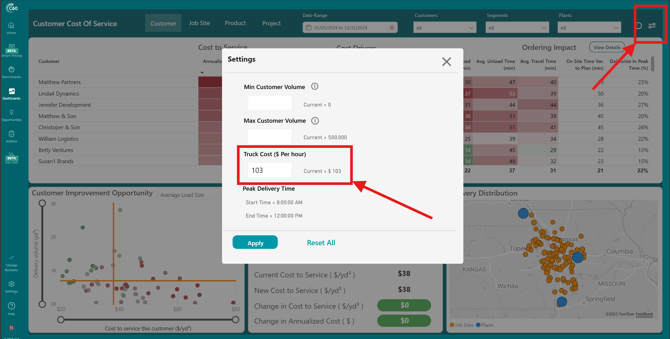
Note: You will need to make the adjustment to the hourly trucking cost in the master settings located in the bottom left hand panel. Only users with administrator privileges will be able to access the master settings.
Method 2: Total Cost of Ownership Roll-up
In this method, a producer determines which annual costs categories they would like to include in the hourly trucking cost.
Category ideas:
- Fixed (annual): Depreciation/lease, interest, insurance, licensing/permits, overhead allocation, etc.
- Variable (usage-based): Fuel/DEF, tires, routine maintenance & repairs, etc.
- Labor (driver): Wages, overtime, benefits, etc.
- Allocated overhead: Dispatch/admin, safety, HR/timekeeping, etc.
Once the categories are finalized, you will need to determine the number of production hours. This can be an estimated multiple ways:
- Take the average numbers of hours worked per day multiplied but the number of working days
- Multiple the average cycle time of a delivery by the number of deliveries in a year
- You can choose to multiply this value by a factor > 1 to account for idle time
- Use payroll data to determine the total number of driver paid hours.
Lastly, sum the total fix + variable costs and divide by the production hours to arrive at a hourly trucking cost value.
Deliveries Settings impact the following dashboards:
- Customer Cost of Service
- Customer Delivery Performance
- Customer Scorecard
- Demand Spread Index
- Margin by Customer
- Sales Analyzer
- Truck Activity Comparison
- Truck Usage