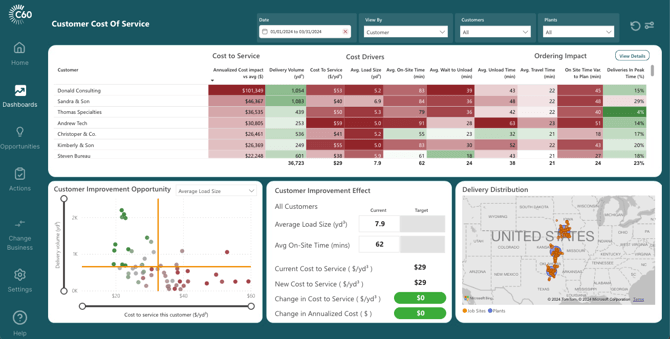
Customer Name
When a customer code is used for multiple customer names, C60 replaces the customer's name with the customer code. Ex COD/Cash sales customers.
Annualized Cost Impact vs avg ($)
Opportunity value when comparing individual customers or job sites against the average customer or job site. C60 calculates this field by taking the difference in servicing individual customers to the all-customer average then multiplying by the delivered volume in the selected date range followed by annualizing the cost impact.
Delivery Volume (yd3 )
The delivered volume shipped to the customer.
Note: C60 only includes volumes from deliveries that have been correctly flagged as completed and delivered. C60 excludes volumes from cancelled or pick up deliveries.
Cost To Service ($/yd3)
The cost to service is calculated by multiplying the hourly trucking cost (user inputted value) by the total cycle minutes (includes planned loading time, travel time both ways and on-site time) and dividing by the average load size.
Avg. Load Size (yd3 )
The average load size of each valid delivery to the customer.
Note: Deliveries that have been cancelled or orders that have been picked up are excluded.
Avg. On-Site Time(min)
Calculated by subtracting valid leave site timestamps from arrive site timestamps.
Note: If either the leave site or arrive site timestamp for a particular delivery does not pass our status accuracy checks, C60 replaces the on-site time for that delivery with the average on-site time of valid deliveries.
Avg. Wait to Unload(min)
Calculated by subtracting the start unload timestamp from the arrive site timestamp.
Note: Both timestamps must pass status accuracy logic checks.
Avg. Unload Time (min)
Calculated by subtracting the leave site timestamp from the start unload timestamp.
Note: Both timestamps must pass status accuracy logic checks.
Avg. Travel Time(min)
C60 currently uses the theoretical or planned travel time. We are enhancing this to use actual travel times in May 2024.
On Site Time Var. to Plan(min)
This value represents the time variance of how long the truck was on site for verse how long dispatch estimated. Where positive values represent an under estimation (where the truck took longer than planned) and negative values represent over estimation (where the truck took less time than planned)
Deliveries In Peak Time(%)
This value represents the number of deliveries that occurred during the peak delivery time. The peak delivery time is a user defined timeframe that can be adjusted in the admin settings. For a delivery to be considered in the peak time, the leave plant timestamp must occur within the peak time range.